
 By
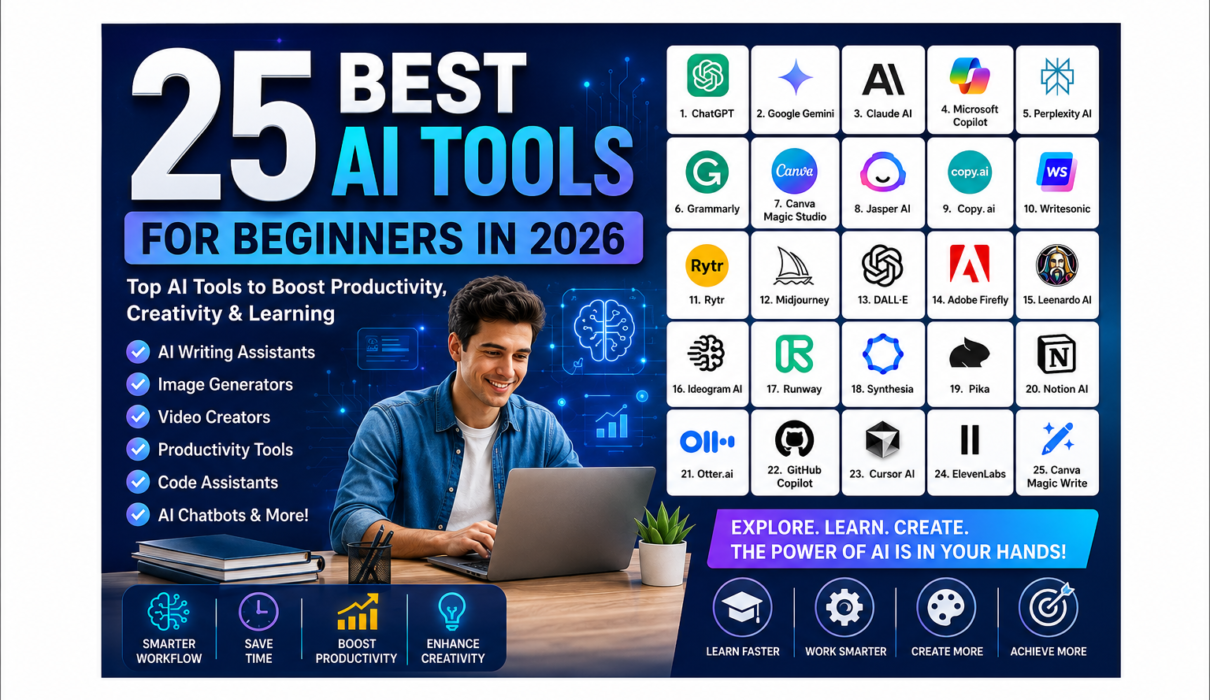
By 25 Best AI Tools for Beginners in 2026
Artificial Intelligence (AI) is no longer limited to large technology companies or professional developers. Today, anyone can use AI to write content, create images, edit videos, design presentations, improve productivity, and even learn new skills.
If you’re just starting your AI journey, choosing the right tools can feel overwhelming. Hundreds of AI applications are available, each promising to save time and improve your work. The good news is that many of the best AI tools are beginner-friendly and offer free plans to help you get started.
In this guide, we’ve carefully selected the 25 best AI tools for beginners in 2026, covering AI chatbots, writing assistants, image generators, video creators, productivity apps, coding tools, and more.
Whether you’re a student, blogger, content creator, entrepreneur, freelancer, or business owner, you’ll find the perfect AI tool for your needs.
Why Should Beginners Use AI Tools?
AI tools can help you:
- Save hours of repetitive work
- Generate ideas instantly
- Improve writing quality
- Create professional images and videos
- Summarize documents
- Learn faster
- Increase productivity
- Automate daily tasks
- Improve creativity
- Build new digital skills
The best part? Most of these tools offer free plans, making them ideal for beginners.
Quick Comparison Table
| Tool | Best For | Free Plan |
|---|---|---|
| ChatGPT | Writing & Learning | ✅ |
| Google Gemini | Research | ✅ |
| Claude AI | Long-form Writing | ✅ |
| Microsoft Copilot | Office Productivity | ✅ |
| Perplexity AI | AI Search | ✅ |
| Canva Magic Studio | Design | ✅ |
| Grammarly | Writing | ✅ |
25 best AI tools for beginners in 2026
1. ChatGPT
Best For
Writing, brainstorming, coding, learning, and everyday productivity.
ChatGPT has become one of the world’s most popular AI assistants. It can answer questions, explain complex topics, generate blog posts, write emails, summarize documents, and even help you learn programming.
Key Features
- Natural conversations
- Content creation
- Code generation
- Language translation
- Homework assistance
- Brainstorming ideas
- Business planning
Pros
✔ Easy to use
✔ Beginner-friendly
✔ Supports dozens of languages
✔ Fast responses
✔ Free version available
Cons
- Some advanced models require a paid subscription.
- May occasionally produce incorrect information, so fact-check important outputs.
Pricing
- Free Plan available
- Paid plans available for advanced capabilities
Best For
Students, bloggers, marketers, freelancers, programmers, and business owners.
Official Website: chatgpt.com
2. Google Gemini
Best For
Research, productivity, and Google Workspace users.
Google Gemini integrates seamlessly with Gmail, Google Docs, Drive, and Search, making it an excellent assistant for anyone already using Google’s ecosystem.
Key Features
- AI-powered research
- Document summarization
- Email drafting
- Spreadsheet assistance
- Image understanding
- Coding support
Pros
✔ Excellent research capabilities
✔ Google integration
✔ Fast responses
✔ Free version available
Cons
- Some advanced features are subscription-based.
- Performance may vary depending on the task.
Pricing
- Free Plan
- Premium subscription available
Best For
Students, professionals, teachers, and researchers.
Official Website: gemini.google.com
3. Claude AI
Best For
Long-form writing and document analysis.
Claude AI is widely recognized for generating natural, detailed, and context-aware responses. It excels at summarizing lengthy documents, drafting articles, and assisting with analytical tasks.
Key Features
- Long-context conversations
- Document summarization
- Creative writing
- Coding assistance
- Research support
Pros
✔ Excellent writing quality
✔ Strong reasoning
✔ Great for large documents
Cons
- Daily usage limits on the free plan.
- Some advanced features require a subscription.
Pricing
- Free Plan
- Paid plans available
Best For
Writers, students, educators, and professionals.
Official Website: claude.ai
4. Microsoft Copilot
Best For
Microsoft Office users.
Microsoft Copilot enhances Word, Excel, PowerPoint, Outlook, and Teams with AI-powered assistance, helping users draft documents, analyze spreadsheets, create presentations, and manage emails more efficiently.
Key Features
- Word document generation
- Excel data analysis
- PowerPoint presentation creation
- Outlook email assistance
- Teams meeting summaries
Pros
✔ Excellent Office integration
✔ Saves time on repetitive tasks
✔ Improves workplace productivity
Cons
- Full functionality requires a Microsoft subscription.
- Best suited for users already in the Microsoft ecosystem.
Pricing
- Free version available
- Paid Microsoft plans unlock additional features
Best For
Office workers, businesses, students, and professionals.
Official Website: copilot.microsoft.com
5. Perplexity AI
Best For
AI-powered search and research.
Perplexity AI combines conversational AI with web search to provide direct answers backed by cited sources. It’s especially useful for research, fact-checking, and exploring complex topics.
Key Features
- AI search engine
- Source citations
- Research assistance
- Real-time information
- Follow-up questions
Pros
✔ Accurate, cited answers
✔ Easy to use
✔ Great for research
✔ Free version available
Cons
- Some advanced capabilities require a paid plan.
- Search quality depends on available web sources.
Pricing
- Free Plan
- Pro subscription available
Best For
Researchers, students, journalists, and knowledge workers.
Official Website: www.perplexity.ai
6. Grammarly
Best For
Grammar checking and writing improvement.
Grammarly uses AI to improve grammar, spelling, punctuation, clarity, tone, and style. It’s an essential tool for anyone who writes emails, essays, blog posts, or professional documents.
Key Features
- Grammar correction
- Spell checking
- Tone suggestions
- AI writing assistance
- Plagiarism detection (Premium)
Pros
✔ Very beginner-friendly
✔ Browser extensions
✔ Excellent writing suggestions
Cons
- Premium features require a subscription.
- Suggestions may occasionally need manual review.
Pricing
- Free Plan
- Premium Plan
Best For
Students, bloggers, professionals, and business users.
Official Website: www.grammarly.com
7. Canva Magic Studio
Best For
Graphic design and content creation.
Canva Magic Studio brings AI-powered design features into one of the world’s most popular design platforms. You can create presentations, social media graphics, blog images, videos, and marketing materials in minutes.
Key Features
- AI image generation
- Magic Write
- Background remover
- Magic Design
- Video editing
- Presentation creation
Pros
✔ Extremely beginner-friendly
✔ Thousands of templates
✔ Free version available
✔ Excellent for social media
Cons
- Some AI tools are available only in Canva Pro.
- High-volume usage may require a paid plan.
Pricing
- Free Plan
- Canva Pro
Best For
Content creators, bloggers, marketers, teachers, and small businesses.
Official Website: www.canva.com
8. Jasper AI
Best For
Marketing content, blog writing, and business copywriting.
Jasper AI is one of the most popular AI writing assistants for marketers and businesses. It can create SEO-friendly blog posts, product descriptions, ad copy, emails, and social media content in minutes.
Key Features
- AI blog writer
- Marketing templates
- Brand voice customization
- SEO integration
- Multi-language support
- Team collaboration
Pros
✔ Excellent long-form writing
✔ Easy-to-use interface
✔ Great for businesses
✔ Saves significant writing time
Cons
- Premium pricing may not suit casual users.
- Some outputs still require editing for a personal touch.
Pricing
- Free trial available
- Paid subscription plans
Best For
Bloggers, marketers, agencies, entrepreneurs, and content teams.
Official Website: www.jasper.ai
9. Copy.ai
Best For
Marketing copy and social media content.
Copy.ai helps users quickly create engaging marketing content, including Facebook ads, Instagram captions, product descriptions, blog outlines, and email campaigns.
Key Features
- AI content generation
- Blog outlines
- Product descriptions
- Social media captions
- Email writing
- Sales copy
Pros
✔ Very beginner-friendly
✔ Large template library
✔ Fast content generation
Cons
- Long-form content may require manual refinement.
- Advanced workflows are part of paid plans.
Pricing
- Free Plan
- Paid Plans
Best For
Small businesses, marketers, freelancers, and startups.
Official Website: www.copy.ai
10. Writesonic
Best For
SEO content and AI marketing.
Writesonic combines AI writing with SEO optimization, making it an excellent tool for bloggers who want to rank higher in search engines.
Key Features
- Blog writer
- AI article generator
- Landing page creation
- Chat assistant
- SEO optimization
- Image generation
Pros
✔ SEO-focused
✔ Multiple content formats
✔ User-friendly interface
✔ Good value for beginners
Cons
- Free credits are limited.
- Some advanced tools require a subscription.
Pricing
- Free Plan
- Premium Plans
Best For
SEO bloggers, digital marketers, entrepreneurs, and agencies.
Official Website: writesonic.com
11. Rytr
Best For
Affordable AI writing.
Rytr is a budget-friendly AI writing assistant that supports over 40 use cases, including blog writing, email creation, ad copy, and social media posts.
Key Features
- AI writing assistant
- Blog generator
- Email writing
- Content improvement
- Multiple languages
- Tone customization
Pros
✔ Affordable
✔ Easy to learn
✔ Beginner-friendly
✔ Good quality output
Cons
- Limited monthly characters on the free plan.
- Fewer advanced features than premium competitors.
Pricing
- Free Plan
- Low-cost Premium Plans
Best For
Students, freelancers, bloggers, and small businesses.
Official Website: rytr.me
12. Midjourney
Best For
Professional AI image creation.
Midjourney is considered one of the most advanced AI image generators available. It creates artistic, realistic, and highly detailed images from simple text prompts.
Key Features
- Photorealistic images
- Artistic illustrations
- Fantasy artwork
- High-resolution output
- Advanced prompt support
Pros
✔ Exceptional image quality
✔ Stunning realism
✔ Active community
✔ Regular updates
Cons
- Learning prompt writing takes practice.
- Primarily accessed through Discord, which may feel unfamiliar to beginners.
Pricing
- Paid subscription
Best For
Graphic designers, artists, bloggers, YouTubers, and marketers.
Official Website: www.midjourney.com
13. DALL·E
Best For
Creating AI-generated images from text.
DALL·E enables users to generate illustrations, realistic photos, concept art, and creative visuals simply by describing what they want in natural language.
Key Features
- Text-to-image generation
- Image editing
- Image expansion
- Creative artwork
- High-quality outputs
Pros
✔ Simple interface
✔ Excellent creativity
✔ Useful for blog images and presentations
✔ Beginner-friendly
Cons
- Some advanced features may depend on the platform used.
- Results can vary based on prompt quality.
Pricing
- Free usage may be available with limits
- Paid options available through supported platforms
Best For
Content creators, educators, designers, and bloggers.
Official Website: openai.com/dall-e
14. Adobe Firefly
Best For
Professional graphic design and image editing.
Adobe Firefly integrates AI directly into Adobe’s creative ecosystem, allowing users to generate images, add effects, remove backgrounds, and edit graphics using natural language prompts.
Key Features
- AI image generation
- Generative Fill
- Text effects
- Background replacement
- Photoshop integration
- Illustrator integration
Pros
✔ Professional-quality output
✔ Seamless Adobe integration
✔ Excellent editing capabilities
✔ Commercial-friendly workflows
Cons
- Some features require an Adobe Creative Cloud subscription.
- Beginners may face a learning curve with Adobe applications.
Pricing
- Free limited access
- Adobe Creative Cloud subscription for advanced features
Best For
Designers, photographers, marketers, agencies, and businesses.
Official Website: firefly.adobe.com
Tips for Choosing the Right AI Tool
When selecting an AI tool, consider these factors:
- Purpose: Are you writing, designing, coding, researching, or creating videos?
- Ease of Use: Beginners should prioritize intuitive interfaces and tutorials.
- Free Plan: Start with free versions before upgrading.
- Integration: Choose tools that work with software you already use.
- Privacy: Review each tool’s data and privacy policies before uploading sensitive information.
- Budget: Compare features to ensure you’re paying only for what you need.
15. Leonardo AI
Best For
AI-generated artwork, gaming assets, and marketing visuals.
Leonardo AI has become one of the most popular AI image generators thanks to its high-quality outputs and beginner-friendly interface. It’s widely used by bloggers, designers, and content creators to generate unique illustrations, realistic photos, and digital art.
Key Features
- AI image generation
- Photo-realistic images
- Character creation
- AI canvas editing
- Prompt enhancement
- Multiple image styles
Pros
✔ Free daily credits
✔ Excellent image quality
✔ Easy-to-use interface
✔ Fast image generation
Cons
- Daily free credits are limited.
- Advanced models may require a paid subscription.
Pricing
- Free Plan
- Premium Plans available
Best For
Bloggers, YouTubers, digital marketers, designers, and social media creators.
Official Website: leonardo.ai
16. Ideogram AI
Best For
Creating AI images with accurate text.
Unlike many AI image generators, Ideogram AI excels at generating images that include readable text, making it ideal for posters, logos, YouTube thumbnails, Pinterest graphics, and social media posts.
Key Features
- Text-to-image generation
- Excellent typography
- Logo creation
- Poster design
- Social media graphics
- Multiple artistic styles
Pros
✔ Outstanding text rendering
✔ Beginner-friendly
✔ Fast generation
✔ Free plan available
Cons
- Editing features are more limited than some competitors.
- Advanced options require a paid plan.
Pricing
- Free Plan
- Premium Plans
Best For
Graphic designers, bloggers, Pinterest creators, and marketers.
Official Website: ideogram.ai
17. Runway
Best For
AI-powered video editing and content creation.
Runway is one of the leading AI video platforms. It enables users to generate videos from text prompts, remove backgrounds, edit footage, and apply advanced AI effects without professional editing skills.
Key Features
- AI video generation
- Background removal
- Motion tracking
- Video editing
- Image-to-video
- AI effects
Pros
✔ Professional-quality results
✔ Beginner-friendly interface
✔ Cloud-based editing
✔ Frequent feature updates
Cons
- Free exports may include limitations.
- High-resolution rendering is available on paid plans.
Pricing
- Free Plan
- Paid subscriptions
Best For
YouTubers, marketers, filmmakers, educators, and content creators.
Official Website: runwayml.com
18. Synthesia
Best For
Creating AI avatar videos.
Synthesia allows users to produce professional-looking videos using realistic AI presenters without needing a camera, microphone, or studio. Simply type your script, choose an avatar, and generate a polished video.
Key Features
- AI avatars
- Text-to-video
- Multiple languages
- Voiceovers
- Presentation videos
- Corporate training videos
Pros
✔ Professional results
✔ Saves production costs
✔ Supports many languages
✔ Easy to use
Cons
- Limited customization compared to traditional video production.
- Requires a subscription for full access.
Pricing
- Paid Plans
- Free demos available
Best For
Businesses, educators, trainers, HR teams, and marketers.
Official Website: www.synthesia.io
19. Pika
Best For
Text-to-video generation.
Pika is designed to make AI video creation simple for beginners. You can create short animated clips, cinematic scenes, and social media videos using only text prompts or images.
Key Features
- Text-to-video
- Image-to-video
- Animation generation
- Video editing
- Creative effects
Pros
✔ Simple interface
✔ Great for beginners
✔ High-quality animations
✔ Fast rendering
Cons
- Free usage is limited.
- Longer videos may require premium plans.
Pricing
- Free Plan
- Paid subscription
Best For
Content creators, marketers, YouTubers, and social media managers.
Official Website: pika.art
20. Notion AI
Best For
Productivity, note-taking, and project management.
Notion AI combines note-taking with AI-powered writing and organization. It helps users summarize documents, brainstorm ideas, draft content, and manage projects efficiently.
Key Features
- AI writing assistant
- Document summarization
- Meeting notes
- Task management
- Knowledge base
- Project planning
Pros
✔ Excellent productivity tool
✔ User-friendly
✔ Great collaboration features
✔ Time-saving automation
Cons
- AI features require a paid add-on or supported plan.
- Large workspaces may have a learning curve.
Pricing
- Free Plan
- Paid Plans
Best For
Students, teams, bloggers, startups, and professionals.
Official Website: www.notion.so
21. Otter.ai
Best For
Meeting transcription and note-taking.
Otter.ai automatically records, transcribes, and summarizes meetings, interviews, and lectures. It helps users save time by generating searchable transcripts and key takeaways.
Key Features
- Live transcription
- Meeting summaries
- Speaker identification
- Searchable notes
- Cloud synchronization
- Collaboration tools
Pros
✔ Accurate transcription
✔ Easy sharing
✔ Great for online meetings
✔ Saves hours of manual note-taking
Cons
- Free monthly transcription minutes are limited.
- Accuracy may vary with background noise or multiple speakers.
Pricing
- Free Plan
- Premium Plans
Best For
Students, journalists, business professionals, researchers, and remote teams.
Official Website: otter.ai
Why These AI Tools Are Perfect for Beginners
All the tools featured in this guide share several beginner-friendly characteristics:
- Easy-to-use interfaces with minimal learning curves.
- Free plans or trials to explore features before paying.
- Helpful documentation and tutorials to speed up learning.
- Cloud-based access, so there’s no need for powerful hardware in most cases.
- Broad use cases, from writing and design to research and productivity.
Choosing tools that align with your goals—whether creating content, studying, or improving productivity—will help you get the most value from AI.
22. GitHub Copilot
Best For
AI-assisted coding and software development.
GitHub Copilot acts as an AI programming assistant that suggests code, completes functions, and helps developers write software faster. It supports multiple programming languages and integrates with popular code editors like Visual Studio Code.
Key Features
- AI code completion
- Code suggestions
- Bug fixing assistance
- Documentation generation
- Multi-language support
Pros
✔ Speeds up coding
✔ Supports many programming languages
✔ Excellent Visual Studio Code integration
Cons
- Best suited for users with some coding knowledge.
- Full features require a paid subscription after the trial period.
Pricing
- Free for eligible users (such as some students and maintainers)
- Paid subscription for others
Best For
Developers, coding students, and software engineers.
Official Website: github.com/features/copilot
23. Cursor AI
Best For
AI-powered code editing.
Cursor AI is a modern code editor built with AI at its core. It can explain code, generate functions, refactor projects, and answer programming questions directly within the editor.
Key Features
- AI coding assistant
- Code explanation
- Smart debugging
- Code generation
- Project-wide understanding
Pros
✔ Modern interface
✔ Fast AI assistance
✔ Great for learning programming
Cons
- Mainly useful for developers.
- Advanced usage requires a paid plan.
Pricing
- Free Plan
- Pro Plan
Best For
Beginner programmers, students, and professional developers.
Official Website: cursor.com
24. ElevenLabs
Best For
AI voice generation and text-to-speech.
ElevenLabs is known for producing realistic AI voices. It can convert text into natural-sounding speech, clone voices (with permission), and create voiceovers for videos, podcasts, audiobooks, and presentations.
Key Features
- Text-to-speech
- AI voice cloning
- Multi-language support
- Voice library
- Audio dubbing
Pros
✔ Extremely realistic voices
✔ Easy to use
✔ High-quality audio output
Cons
- Voice cloning should be used responsibly and with appropriate authorization.
- Free plan has usage limits.
Pricing
- Free Plan
- Paid Plans
Best For
YouTubers, podcasters, educators, marketers, and content creators.
Official Website: elevenlabs.io
25. Canva Magic Write
Best For
Quick AI writing inside Canva.
Canva Magic Write helps users generate blog outlines, captions, emails, presentation content, and marketing copy directly within Canva, making it ideal for those who create both written and visual content.
Key Features
- AI writing assistant
- Blog outlines
- Social media captions
- Presentation text
- Marketing copy
- Built into Canva
Pros
✔ Beginner-friendly
✔ Works seamlessly with Canva designs
✔ Saves time
Cons
- Some AI credits are limited on free accounts.
- Best experienced with Canva Pro.
Pricing
- Free Plan
- Canva Pro
Best For
Bloggers, marketers, teachers, and social media creators.
Official Website: www.canva.com
Comparison Table of the Best AI Tools for Beginners
| AI Tool | Category | Free Plan | Best For |
|---|---|---|---|
| ChatGPT | AI Chatbot | ✅ | Writing, learning |
| Google Gemini | AI Assistant | ✅ | Research |
| Claude AI | AI Chatbot | ✅ | Long-form writing |
| Microsoft Copilot | Productivity | ✅ | Microsoft Office |
| Perplexity AI | AI Search | ✅ | Research |
| Grammarly | Writing | ✅ | Grammar & editing |
| Canva Magic Studio | Design | ✅ | Graphic design |
| Jasper AI | Writing | Trial | Marketing content |
| Copy.ai | Writing | ✅ | Copywriting |
| Writesonic | Writing | ✅ | SEO content |
| Rytr | Writing | ✅ | Budget AI writing |
| Midjourney | Image | ❌ | AI art |
| DALL·E | Image | Limited | Image generation |
| Adobe Firefly | Image | Limited | Creative design |
| Leonardo AI | Image | ✅ | AI artwork |
| Ideogram AI | Image | ✅ | Images with text |
| Runway | Video | ✅ | AI video editing |
| Synthesia | Video | Demo | AI avatars |
| Pika | Video | ✅ | Text-to-video |
| Notion AI | Productivity | Limited | Notes & planning |
| Otter.ai | Productivity | ✅ | Meeting transcription |
| GitHub Copilot | Coding | Limited | Programming |
| Cursor AI | Coding | ✅ | AI code editor |
| ElevenLabs | Audio | ✅ | Voice generation |
| Canva Magic Write | Writing | ✅ | Content creation |
How to Choose the Right AI Tool
Before selecting an AI tool, ask yourself these questions:
- What problem am I trying to solve?
- Does the tool offer a free plan?
- Is it easy for beginners?
- Does it integrate with the software I already use?
- Are there tutorials or a strong support community?
- Does it fit my budget as my needs grow?
Starting with free versions allows you to experiment before committing to a paid subscription.
Frequently Asked Questions (FAQs)
1. What is the best AI tool for complete beginners?
ChatGPT is an excellent starting point because it’s versatile, easy to use, and supports writing, learning, brainstorming, coding, and everyday productivity.
2. Which AI tools are completely free?
Many tools offer free plans, including:
- ChatGPT
- Google Gemini
- Claude AI
- Grammarly
- Canva
- Leonardo AI
- Perplexity AI
- Ideogram AI
- Otter.ai
Keep in mind that free plans often have usage limits.
3. Which AI tool is best for creating images?
If you’re looking for artistic or photorealistic images, Midjourney and Leonardo AI are excellent choices. DALL·E and Adobe Firefly are also great for beginners.
4. Which AI writing tool is best?
For general writing, ChatGPT is highly versatile. Jasper AI, Writesonic, Rytr, and Copy.ai are also strong options depending on your content and marketing needs.
5. Can beginners use AI without coding?
Absolutely. Most AI tools listed in this guide are designed with user-friendly interfaces, allowing anyone to get started without programming knowledge.
Final Thoughts
Artificial Intelligence is transforming how we work, learn, and create. Whether you’re writing blog posts, designing graphics, editing videos, coding software, or researching new ideas, there’s an AI tool to make the process easier.
As a beginner, you don’t need to master every tool at once. Start with a few versatile options like ChatGPT, Canva Magic Studio, Perplexity AI, and Grammarly. As your skills and needs evolve, explore specialized tools for image generation, video creation, coding, or voice synthesis.
The best approach is to experiment with free plans, compare features, and build a toolkit that supports your personal or professional goals. By embracing AI today, you’ll be better prepared for the future of work and technology.
Suggested Posts
- Final Guide – Your First Step into Artificial Intelligence (Complete Beginner’s Roadmap 2026)
- What Is Artificial Intelligence (AI)? A Complete Beginner’s Guide
- What Is ChatGPT and How Does It Work?
- Artificial Intelligence (AI) in Daily Life – A Complete Guide
- Skills You Need to Learn Artificial Intelligence
- Free Resources to Learn Artificial Intelligence
- AI vs Machine Learning vs Deep Learning
- Top Benefits of Artificial Intelligence
- Ethical Concerns in Artificial Intelligence
- How to Start Learning AI Step by Step
Call to Action
Follow us on NextGenAIToolNest to get more updates on Artificial Intelligence (AI).
3 Comments